Stop Guessing What to Type Into AI.
A practical visual playbook for creating better images, videos, content and marketing assets with AI — with ready-to-use prompts you can copy, customize and make your own.
Get the newly upgraded guide at the Early Access Price before it increases.
You Have AI. But Do You Know What To Tell It?
You open the AI tool, type something, generate a result — and it still doesn't look or sound anything like what you imagined.
You know what you want, but turning the idea into a useful instruction is the hard part.
The face, product, clothing or composition changes when you only wanted one small thing fixed.
You get a good first result with one thing wrong — and start everything from scratch.
We Did the Prompting Homework. You Just Make It Yours.
Instead of starting with a blank prompt box, use practical prompt structures, examples and workflows that are already built for you.
Ready-to-use prompts
Start with a working prompt, then replace the details with your own.
Understand the direction
See what each prompt is trying to communicate and what you can customize.
Learn to refine
Don't restart when 90% is right. Learn how to tell AI what to keep and what to change.
Everything You Need in One Practical AI Playbook.
Keep the guide beside you as a working reference. Find the workflow you need, copy the sample prompt, edit the details, paste it into your AI tool and start creating.
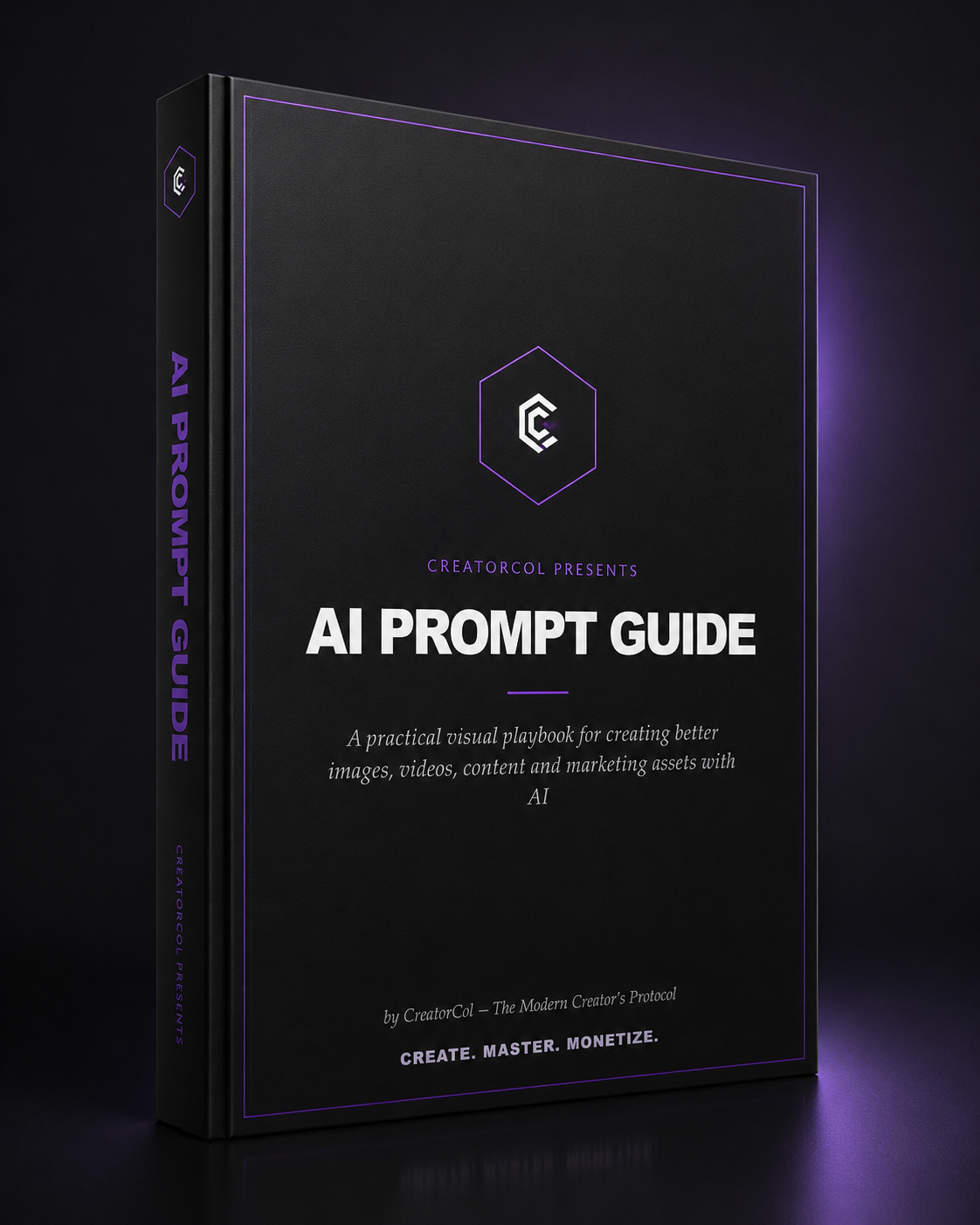
One Guide. A Lot More Than Just Prompts.
The upgraded guide brings the practical AI workflows, examples, prompts and refinement techniques together in one place — so there is something useful whether you're creating for yourself, your audience or your business.
Prompting Fundamentals
- What a prompt actually is
- How to give AI better instructions
- Role, context, task & constraints
- Output direction
- Why vague prompts fail
AI Image Creation
- Professional headshots
- AI photoshoots
- Reference-image workflows
- Birthday & pre-wedding concepts
- Product & advertising visuals
Reference Images & Creative Direction
- Use a reference without copying identity
- Match composition & lighting
- Control what AI changes
- Combine your photo with a reference
- Build repeatable visual styles
Image → Video
- Turning still images into motion
- Product video concepts
- Talking / presenter-style videos
- UGC-style content
- Digital avatars & presenters
AI for Business & Marketing
- Marketing ideas & angles
- Ad copy & campaign concepts
- Product descriptions
- Customer responses
- Launch & promotional content
AI for Content Creation
- Content ideas & pillars
- Hooks that stop the scroll
- Short-form scripts
- Captions & engagement posts
- Content calendars & series
Refining AI Results
- Fix faces, hands & clothing
- Fix lighting & composition
- Remove or add objects
- Correct text & details
- Preserve what works, change what doesn't
Ready-to-Use Prompt Library
- Copy-and-customize prompts
- Visual prompt frameworks
- Business prompts
- Content prompts
- Refinement prompts
The CreatorCol Workflow
- CREATE — start with a clear goal and usable prompt
- REVIEW — identify what worked and what didn't
- REFINE — make targeted changes instead of starting over
- REPEAT — build better results through iteration
And You Don't Have to Start From Scratch.
Every major section comes with reusable sample templates and ready-to-use prompts.
Simply copy, edit the details to fit what you want, paste them into your AI tool, and start creating.
AI Is Becoming Useful for Far More Than Chatting
Use it to plan your work, develop ideas, write scripts, create social content, build visuals, market a product and refine your creative work.
"I've been seeing these amazing birthday photoshoots and professional pictures online and honestly thought everybody was going to a studio. I didn't realise some of this could be done with AI. The reference-image method finally made sense to me."

a week ago
"My problem was that I never knew what to type. I would open ChatGPT and just stare at the prompt box. Seeing an actual prompt, understanding why it works and then changing it for what I wanted made AI feel much easier."
2 weeks ago
"I used to think all this AI stuff was mainly for younger people. Now I use it to plan work, organise ideas and help me write things. I realised I didn't need to be an AI expert — I just needed to understand how to give it better instructions."

1 month ago
"I started using AI for content ideas, but now I use it for hooks, scripts, captions and repurposing one idea into different posts. The prompts gave me a much better starting point than just asking AI to 'give me content ideas.'"

2 weeks ago
"Honestly, I don't want the headache of writing prompts from scratch every time. I learnt a lot from this guide, but I love that I can simply go to the right section, pick a template, change a few details and use it immediately. It saves me so much time."

1 week ago
"Oh my God, I didn't realise how useful this guide could be. I started creating content with the prompts and asking people to comment 'PROMPT' if they wanted it. My engagement and followers have gone up, and it's already started bringing me paid opportunities."
1 week ago
Your Next AI Result Doesn't Have to Be a Guess.
Get the upgraded CreatorCol AI Prompt Guide and start creating with a clearer process.
Get the newly upgraded CreatorCol AI Prompt Guide at the Early Access Price before it increases.
GET THE GUIDE NOWReplace this button link with your checkout/payment URL.
Frequently Asked Questions
Everything you need to know before you get started.
1. Is this guide suitable for beginners?
Yes. You don't need to be an AI expert or know how to write prompts already. The guide starts with the fundamentals and then takes you into practical examples and ready-to-use prompts that you can copy, edit and use.
2. Do I need to know how to write prompts?
No. That's exactly what the guide is designed to help you with. Instead of starting from a blank screen, you'll have sample prompts and templates you can copy, customize with your own details, and use immediately.
3. Do I have to memorize all the prompts?
Absolutely not. The guide is designed as a practical reference. When you want to create something, find the relevant section, take the sample prompt, change the details you need, and use it.
4. Is this guide only for creating AI images?
No. You'll also find practical workflows for image-to-video, content creation, hooks, scripts, captions, business and marketing, product advertising, AI refinement and more. Whether you're a content creator, business owner, marketer, freelancer, or simply someone who wants to get more out of AI, there's something you can apply.
5. What if my first AI result doesn't come out the way I want?
That's one of the things the guide teaches you. You won't just learn how to generate something once. You'll also learn how to review the result, identify what's wrong, and give AI a more specific instruction to fix it without unnecessarily starting over.
6. Can I use these prompts for my own business or content?
Yes. The prompts are designed to be customized. You can replace the subjects, products, people, locations, styles, goals and other details to fit your own situation. The goal isn't for everyone to produce the exact same result — it's to give you a strong starting point that you can make your own.
7. Is this the old AI Prompt Guide?
No. This is the newly upgraded edition. We've expanded and updated the guide with more practical prompts, examples, workflows, content-creation resources, business and marketing applications, image-to-video workflows and refinement techniques.
8. Which AI tools can I use with the guide?
The guide focuses on prompting principles and workflows rather than locking you into one specific AI tool. Many of the prompt structures can be adapted across different AI tools, although the exact interface, capabilities and results may vary from one tool to another.
Stop Guessing. Start Creating.
Get the newly upgraded CreatorCol AI Prompt Guide and start using AI with a clearer, more practical process.
GET THE AI PROMPT GUIDE — ₦7,700